Josephine Norton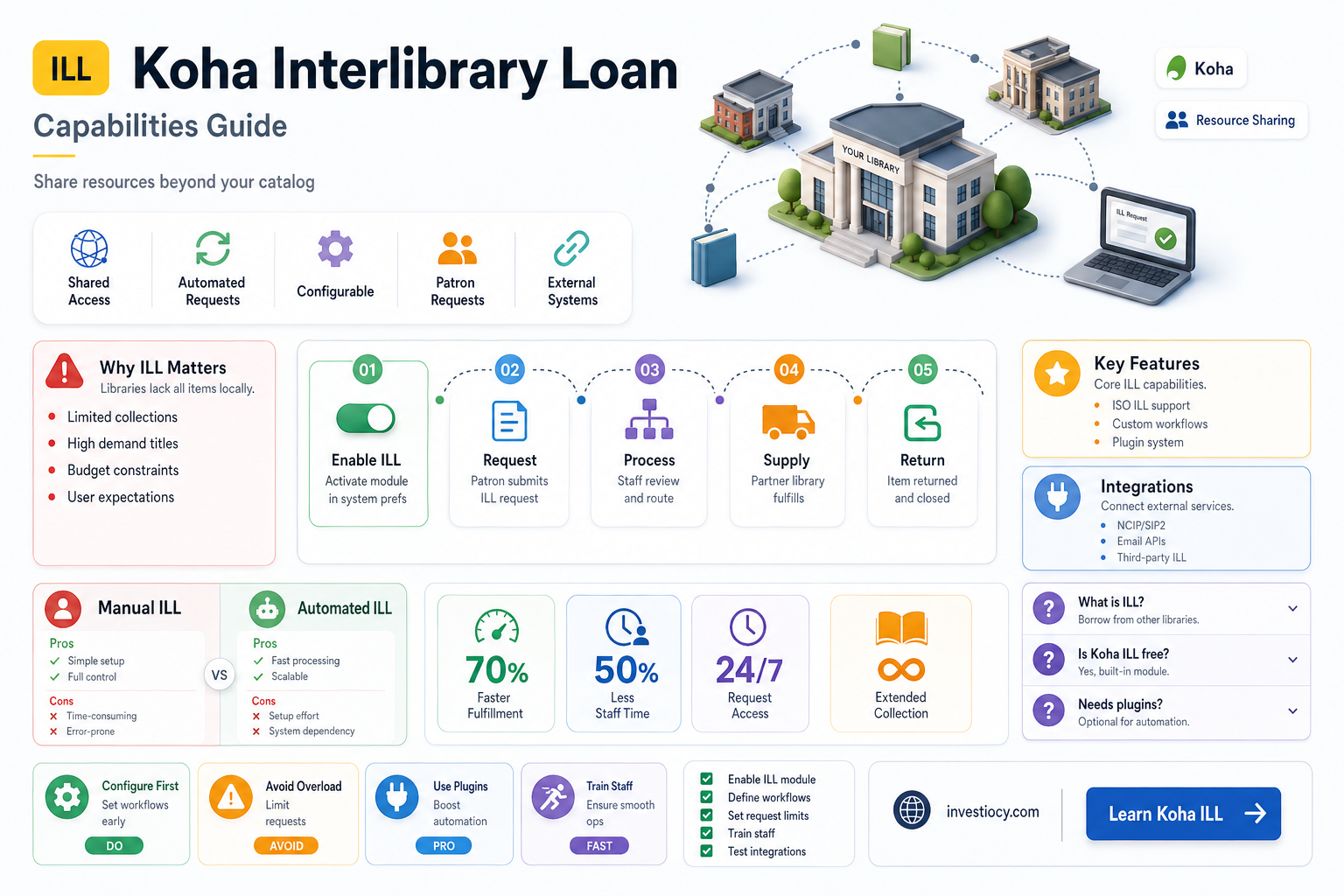
Koha, an open-source Integrated Library System (ILS), offers a robust suite of features to manage library operations efficiently. Among these features is the capability to handle interlibrary loans, which allows libraries to share resources and expand their collection's reach. This functionality enables patrons to request items from other libraries within the network, promoting resource sharing and enhancing user satisfaction. Koha's interlibrary loan module streamlines the process, making it easier for libraries to collaborate and provide a wider range of materials to their communities.
Explore related products





What You'll Learn
- Koha ILL Overview: Introduction to Koha's interlibrary loan (ILL) system, its purpose, and basic functionality
- Setting Up ILL in Koha: Steps to configure and enable ILL within a Koha instance, including necessary parameters
- ILL Workflow in Koha: Detailed process of how ILL requests are made, processed, and managed within the Koha system
- Koha ILL Reports: Available reports in Koha for tracking and managing ILL activities, including statistics and performance metrics
- Troubleshooting Koha ILL: Common issues and solutions related to ILL in Koha, including tips for resolving errors and optimizing performance

Koha ILL Overview: Introduction to Koha's interlibrary loan (ILL) system, its purpose, and basic functionality
Koha's Interlibrary Loan (ILL) system is a robust feature designed to facilitate the borrowing and lending of materials between different libraries. This system streamlines the process of interlibrary transactions, making it more efficient for both library staff and patrons. The primary purpose of Koha ILL is to provide libraries with a comprehensive tool to manage requests, track shipments, and handle financial transactions associated with interlibrary loans.
The basic functionality of Koha ILL includes the ability to create and manage ILL requests, track the status of these requests, and communicate with other libraries. Library staff can easily search for materials in other libraries' catalogs and place requests for items that are not available in their own collection. The system also allows for the customization of workflows and notifications, ensuring that all parties involved in the ILL process are kept informed about the progress of their requests.
One of the key features of Koha ILL is its integration with other library systems and services. This integration enables seamless communication between different libraries, regardless of the software they use. Koha ILL supports various protocols and standards, such as OCLC's WorldShare ILL and the ISO 18613-1 standard for interlibrary loan messages, ensuring compatibility with a wide range of library systems.
In addition to its core ILL functionalities, Koha ILL also offers advanced features such as cost management, which allows libraries to track and manage the costs associated with interlibrary loans. This includes setting up billing rules, generating invoices, and processing payments. The system also provides reporting tools that enable libraries to analyze their ILL activities and make data-driven decisions to improve their services.
Overall, Koha ILL is a powerful and versatile tool that enhances the interlibrary loan process, making it more efficient and user-friendly for both library staff and patrons. Its comprehensive feature set and integration capabilities make it a valuable asset for libraries looking to improve their ILL services.
Explore related products





Setting Up ILL in Koha: Steps to configure and enable ILL within a Koha instance, including necessary parameters
To set up Interlibrary Loan (ILL) in Koha, you must first ensure that your Koha instance is properly configured to support this feature. Begin by logging into your Koha administrative interface and navigating to the "Administration" menu. From there, select "ILL" to access the ILL settings.
The first step is to enable ILL by setting the "ILL Module" option to "Enabled". Once this is done, you will need to configure the necessary parameters for ILL transactions. This includes setting up your library's ILL contact information, such as the name, email address, and phone number of the ILL coordinator.
Next, you will need to define the ILL policies for your library. This involves setting the maximum number of ILL requests allowed per patron, the maximum number of ILL items that can be checked out at one time, and the duration of ILL loans. You can also specify any additional restrictions or requirements for ILL requests, such as requiring a minimum number of days between requests or limiting ILL to certain types of materials.
After configuring your ILL policies, you will need to set up the ILL workflow. This involves defining the steps that ILL requests will go through, such as request submission, approval, shipping, and return. You can also specify the roles and responsibilities of different staff members in the ILL process.
Finally, you will need to test your ILL setup to ensure that it is working correctly. This can be done by submitting test ILL requests and verifying that they are processed according to your configured policies and workflow. Once you are satisfied that your ILL setup is complete and functioning properly, you can begin using ILL in your Koha instance.
Explore related products



ILL Workflow in Koha: Detailed process of how ILL requests are made, processed, and managed within the Koha system
The ILL workflow in Koha is a well-structured process that facilitates efficient interlibrary loan management. It begins with a patron request, which can be made through the Koha interface or via email. The request is then reviewed by library staff, who check the availability of the item within their own collection. If the item is not available, the request is forwarded to the ILL department.
The ILL department staff then search for the item in various databases and contact potential lending libraries. Once a lending library is found, the ILL staff place the request and track its progress. The item is shipped to the requesting library, and upon arrival, it is cataloged and made available to the patron.
Throughout the process, Koha provides various tools to manage and track ILL requests. The system allows for customizable workflows, enabling libraries to adapt the process to their specific needs. Additionally, Koha offers reporting features that help libraries analyze their ILL activity and make informed decisions about resource allocation.
One of the key benefits of using Koha for ILL management is its ability to integrate with other library systems. This integration allows for seamless communication between libraries and facilitates the efficient processing of ILL requests. Furthermore, Koha's open-source nature means that it is constantly being updated and improved by a community of developers, ensuring that it remains a reliable and effective tool for ILL management.
In conclusion, the ILL workflow in Koha is a comprehensive and efficient process that helps libraries manage interlibrary loan requests effectively. With its customizable workflows, reporting features, and integration capabilities, Koha provides a robust solution for ILL management.
Explore related products





Koha ILL Reports: Available reports in Koha for tracking and managing ILL activities, including statistics and performance metrics
Koha, an open-source Integrated Library System (ILS), offers a robust suite of reports specifically designed to track and manage Interlibrary Loan (ILL) activities. These reports provide libraries with essential data to monitor ILL performance, identify trends, and make informed decisions. Among the available reports are detailed statistics on ILL requests, shipments, and returns, which help libraries understand their ILL workflow and resource sharing efficiency.
One key report in Koha's ILL module is the "ILL Statistics" report, which aggregates data on the number of ILL requests made and received, the types of materials requested, and the turnaround time for fulfilling these requests. This report is invaluable for assessing the overall effectiveness of the ILL process and identifying areas for improvement. Libraries can use this data to optimize their ILL policies, allocate resources more effectively, and enhance user satisfaction.
Another important report is the "ILL Performance Metrics" report, which provides a more granular view of ILL activities. This report includes metrics such as the average time to process ILL requests, the percentage of requests fulfilled within a specified timeframe, and the number of overdue ILL items. By analyzing these metrics, libraries can pinpoint bottlenecks in their ILL workflow and implement targeted strategies to improve performance.
In addition to these standard reports, Koha allows libraries to customize their ILL reports to meet specific needs. Using the system's reporting tools, libraries can create ad-hoc reports on various aspects of ILL, such as the number of requests by patron category, the most frequently requested subjects, or the cost of ILL transactions. This flexibility enables libraries to tailor their reporting to align with their unique goals and objectives.
Overall, Koha's ILL reporting capabilities provide libraries with a comprehensive toolkit for managing and optimizing their ILL services. By leveraging these reports, libraries can gain valuable insights into their ILL operations, streamline their workflows, and ultimately enhance their ability to serve patrons effectively.
Explore related products


Troubleshooting Koha ILL: Common issues and solutions related to ILL in Koha, including tips for resolving errors and optimizing performance
One common issue encountered in Koha's ILL module is the failure to process requests due to incorrect patron information. To troubleshoot this, first ensure that the patron's account is active and that their contact information, including email and phone number, is up-to-date. Next, verify that the patron has sufficient permissions to place ILL requests. If the problem persists, check the ILL request queue for any errors or warnings that may indicate why the request is not being processed.
Another frequent problem is the inability to locate the desired item in the ILL search. In such cases, it's essential to confirm that the item is indeed available for ILL by checking the holdings of other libraries within the consortium. If the item is listed as available, but still cannot be located, try refining the search criteria or using alternative search terms. Additionally, consider reaching out to the library directly to inquire about the item's availability and to ensure that it is properly cataloged.
Performance optimization is also crucial for maintaining a smooth ILL process in Koha. Regularly updating the ILL module and ensuring that the system has adequate resources, such as memory and processing power, can help prevent slowdowns and errors. It's also important to monitor the ILL request queue and to address any backlog issues promptly. Implementing automated workflows and utilizing batch processing for routine tasks can further enhance performance and reduce the likelihood of errors.
When troubleshooting ILL issues in Koha, it's helpful to have a comprehensive understanding of the ILL workflow and the various components involved. Familiarize yourself with the ILL request process, including the steps for placing requests, tracking items, and managing patron notifications. Additionally, consider attending training sessions or webinars focused on Koha's ILL module to gain valuable insights and tips for effective troubleshooting.
In conclusion, troubleshooting Koha ILL requires a systematic approach that involves verifying patron information, ensuring item availability, optimizing system performance, and understanding the ILL workflow. By addressing these common issues and implementing best practices, libraries can provide a seamless and efficient ILL experience for their patrons.
Frequently asked questions
Yes, Koha does support interlibrary loan functionality. It allows libraries to manage and track items borrowed from and lent to other libraries.
In Koha, the interlibrary loan process involves creating a request for an item from another library. The system then tracks the item's movement between libraries, including shipping and return.
Yes, Koha can automate several parts of the interlibrary loan process, such as generating shipping labels and sending notifications to users when their requested items are available.