Josephine Norton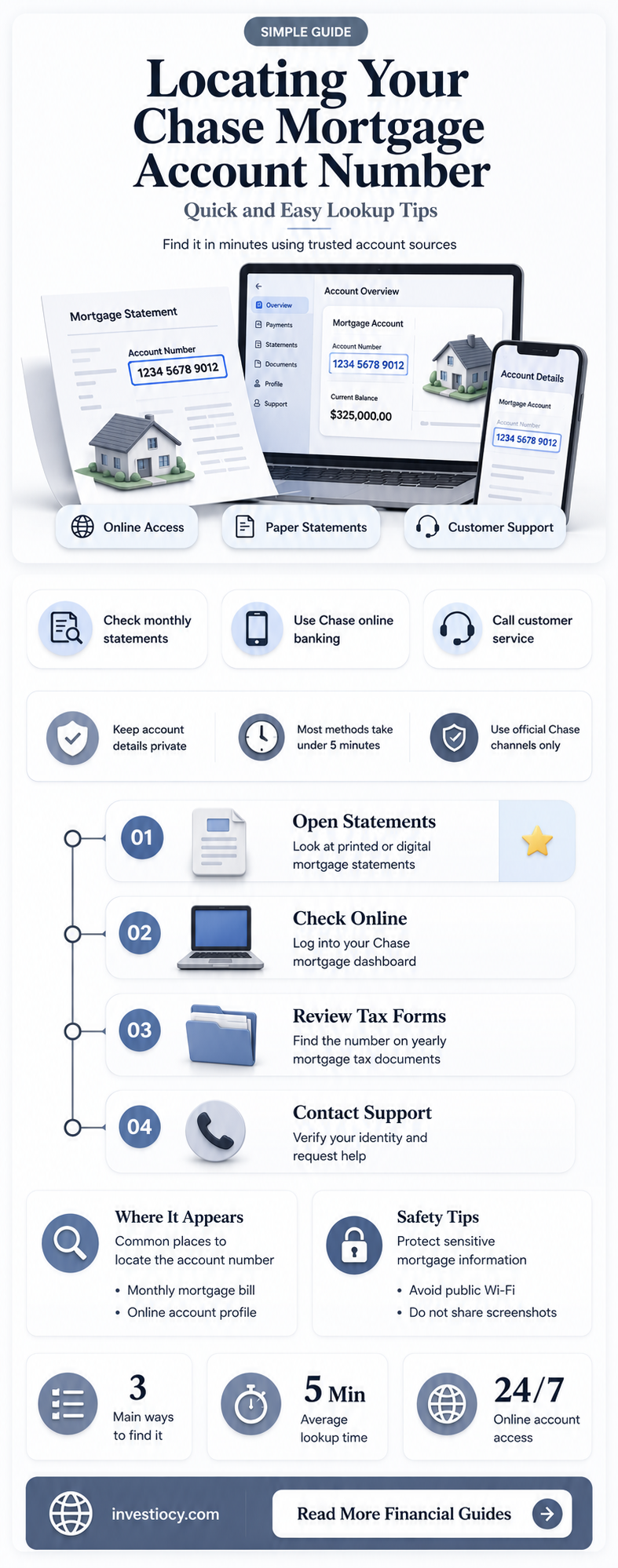
To find your Chase mortgage account number, you'll need to follow a few steps. First, log in to your Chase online banking account. Once you're logged in, look for the Mortgage section, which is usually located under the Home or Accounts tab. Within this section, you should see your mortgage account listed, along with the account number. If you're having trouble finding it online, you can also contact Chase customer service directly. They can assist you in locating your mortgage account number over the phone or through other customer service channels. Remember to have your personal information and account details handy to verify your identity.
Explore related products



What You'll Learn
- Online Banking: Log in to your Chase account and navigate to the mortgage section
- Mobile App: Access your account through the Chase mobile app for a quick lookup
- Statement Review: Check your latest mortgage statement for the account number
- Customer Service: Contact Chase customer support for assistance in finding your account number
- Account Dashboard: Look for the account number on your personalized account dashboard

Online Banking: Log in to your Chase account and navigate to the mortgage section
To access your Chase mortgage account number through online banking, begin by logging into your Chase account. Once logged in, navigate to the mortgage section of the website. This section is typically located under the "Home Lending" or "Mortgage" tab, depending on the website's layout. After accessing the mortgage section, you should be able to view your account details, including your mortgage account number.
If you're having trouble locating the mortgage section, try using the website's search function. Type in keywords such as "mortgage account number" or "home lending" to find the relevant page. Additionally, you can contact Chase's customer service for assistance. They can guide you through the process of finding your mortgage account number online.
It's important to note that for security reasons, Chase may require you to answer security questions or provide additional verification before allowing you to access your mortgage account information. This is a standard security measure to protect your personal and financial information.
Once you've located your mortgage account number, you can use it for various purposes, such as making payments, checking your balance, or contacting customer service for inquiries. Remember to keep your account number and other sensitive information secure to prevent unauthorized access to your account.
In summary, finding your Chase mortgage account number online involves logging into your account, navigating to the mortgage section, and verifying your identity through security measures. By following these steps, you can easily access your mortgage account information and manage your account effectively.
Uncovering Your Home's Financial History: A Guide to Finding Mortgage Records
You may want to see also
Explore related products




Mobile App: Access your account through the Chase mobile app for a quick lookup
To access your Chase mortgage account number through the mobile app, you'll need to have the app installed on your device. If you haven't already, download the Chase mobile app from the App Store or Google Play Store. Once installed, open the app and log in using your Chase online banking credentials.
After logging in, navigate to the mortgage section of the app. This is typically found under the "Home" or "Accounts" tab, depending on the app's layout. Within the mortgage section, you should see your account details, including your account number.
If you're having trouble locating your account number within the app, you can use the search function. Simply tap the search icon (usually a magnifying glass) and enter "mortgage account number" to quickly find the information you need.
For added security, it's a good practice to enable two-factor authentication on your Chase mobile app. This will help protect your account information in case your device is lost or stolen.
Remember, if you're unable to find your account number through the mobile app, you can always contact Chase customer service for assistance. They can provide you with your account number over the phone or through secure online messaging.
Unlocking Opportunities: A Guide to Finding Assumable Mortgages
You may want to see also
Explore related products
![NMLS Study Guide 2026-2027 - 5 Full-Length Practice Tests, SAFE MLO Exam Prep Secrets Book for the Mortgage Loan Originator Exam: [4th Edition]](https://m.media-amazon.com/images/I/717iHac5CwL._AC_UL320_.jpg)



Statement Review: Check your latest mortgage statement for the account number
To find your Chase mortgage account number, a crucial step is to review your latest mortgage statement. This document contains detailed information about your mortgage, including the account number. Look for a section on the statement that lists your account details. The account number is typically a long series of digits, often located near the top of the statement or in a dedicated account information section.
If you have trouble locating the account number on your statement, consider contacting Chase's customer service for assistance. They can guide you through the process of finding the necessary information. It's important to have your statement handy when you call, as the representative may ask you to verify certain details from it.
Another option is to log in to your Chase online banking account. Once logged in, navigate to the mortgage section, where you should be able to view your account details, including the account number. This method is convenient and allows you to access your information quickly and securely.
Remember to keep your account number confidential and secure. It's sensitive information that should not be shared with unauthorized individuals. If you suspect any fraudulent activity or have concerns about the security of your account, contact Chase immediately to report the issue and protect your financial assets.
Discover Your Wells Fargo Mortgage Balance: A Simple Guide
You may want to see also
Explore related products




Customer Service: Contact Chase customer support for assistance in finding your account number
If you're having trouble locating your Chase mortgage account number, reaching out to Chase customer support can be a highly effective solution. The customer service representatives are trained to assist with various banking inquiries, including helping customers find their account numbers. To initiate this process, you can contact Chase through their official website, mobile app, or by calling their customer service phone number. When you reach out, be prepared to provide identifying information such as your name, address, and possibly the last four digits of your Social Security number to verify your identity.
Once you've made contact, explain your situation clearly and ask the representative to guide you through the steps needed to retrieve your mortgage account number. They may ask you a series of questions to better understand your needs and ensure they provide the correct information. It's important to be patient and cooperative during this process, as the representative is there to help you.
In some cases, the customer service representative may be able to provide your account number over the phone or through a secure online portal. However, for security reasons, they may also advise you to visit a local Chase branch in person. If an in-person visit is required, make sure to bring valid identification and any relevant documents related to your mortgage account.
Throughout your interaction with Chase customer support, it's crucial to maintain a polite and respectful demeanor. Remember that the representatives are there to assist you, and being courteous can go a long way in ensuring a positive and efficient experience. By following these steps and working closely with the customer service team, you should be able to successfully locate your Chase mortgage account number.
Securing Your Home: A Guide to Finding Mortgage Protection Information
You may want to see also
Explore related products






Account Dashboard: Look for the account number on your personalized account dashboard
To locate your Chase mortgage account number using the account dashboard, begin by logging into your online banking account. Once you've entered your credentials and accessed your dashboard, look for a section that lists your account information. This is typically found under a heading such as "Account Summary" or "My Accounts." Within this section, you should see details for each of your accounts, including your mortgage account. The account number is usually displayed prominently alongside other key information like the account balance and recent transactions.
If you're having trouble finding the specific section or the account number itself, consider using the search function within your online banking platform. Many banks, including Chase, provide a search bar that allows you to quickly locate specific information. Simply type in "mortgage account number" or a similar query, and the system should direct you to the relevant page or section.
Another option is to contact Chase's customer service for assistance. They can guide you through the process of locating your account number and answer any questions you may have about your mortgage account. When reaching out, have your account credentials and personal information ready to ensure a smooth and secure interaction.
It's important to keep your account number and other sensitive information secure. Avoid sharing your account details with anyone, and always log out of your online banking session when you're finished to prevent unauthorized access. By following these steps and maintaining good security practices, you can easily find and manage your Chase mortgage account number.
Uncover Homeowner Mortgage Secrets: A Property Research Guide
You may want to see also
Frequently asked questions
To find your Chase mortgage account number online, log in to your Chase account on their official website. Navigate to the mortgage section, where you should be able to view your account details, including the account number.
Yes, your Chase mortgage account number is typically printed on your monthly mortgage statement. Look for it in the header or footer section of the document.
Yes, Chase has a mobile app available for both iOS and Android devices. Download the app, log in to your account, and navigate to the mortgage section to find your account number.
If you're unable to find your Chase mortgage account number online, on your statement, or through the mobile app, you can contact Chase customer service for assistance. They will be able to provide you with the necessary information after verifying your identity.